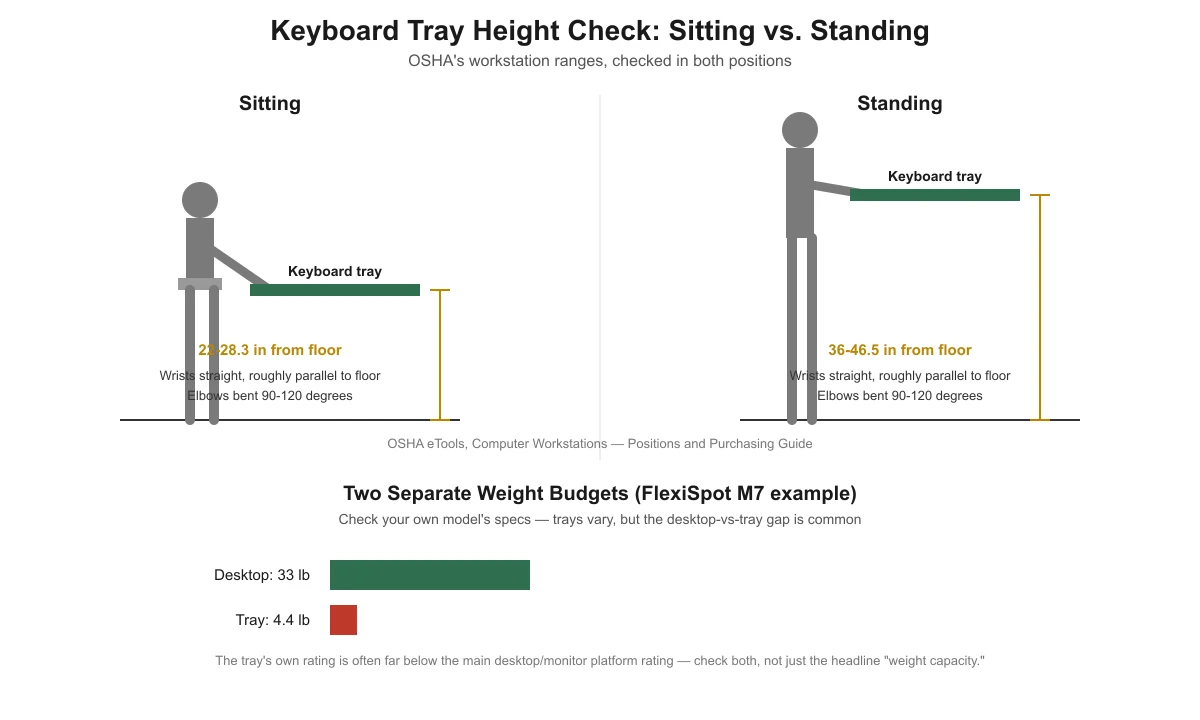
A standing desk converter’s keyboard tray should let your wrists stay straight and your elbows bent 90-120 degrees, both sitting and standing. OSHA’s workstation guidelines put that near 22-28.3 inches from the floor when seated and roughly 36-46.5 inches when standing. If your tray sits outside those ranges, check the adjustment mechanism — and check whether you’re loading the tray past its own (often much lower) weight limit.
Key takeaways
- Check tray height twice: once sitting, once standing. A converter that’s correct seated can put the tray too high or too low the moment you stand up.
- OSHA’s ranges: keyboard height near 22-28.3 inches from the floor seated, and 36-46.5 inches standing, with wrists straight and roughly parallel to the floor.
- Integrated keyboard trays often carry a much lower weight limit than the main desktop surface — on one real example, a FlexiSpot M7 converter rates its desktop at 33 lb but its tray at only 4.4 lb.
- The actual adjustment mechanism (twist-lock knob, gas-lift, or counterbalance) varies by model — check your manual rather than assuming one method works on every converter.
- A tray that’s the right height but too shallow or narrow for your keyboard and mouse causes its own problems, separate from the height issue.
Where should the keyboard tray actually sit?
OSHA’s Computer Workstations eTool gives specific numbers for this. Its purchasing guide states keyboard height “should be adjustable between 22 inches and 30 inches for seated tasks and 36 to 46.5 inches for standing tasks,” and that a keyboard tray’s minimum vertical adjustment range for sitting “should include 22 inches to 28.3 inches from the floor.” On positioning, OSHA says elbows stay “close to the body and bent between 90 and 120 degrees,” with “hands, wrists, and forearms straight, in-line and roughly parallel to the floor.” Cornell’s ergonomics guidance adds the same elbow-angle principle: keep the angle at or greater than 90 degrees.
| Position | OSHA height range (from floor) | What to check |
|---|---|---|
| Seated | 22-28.3 inches (tray minimum adjustment range); 22-30 inches (general keyboard height) | Wrists straight, elbows 90-120 degrees, forearms roughly parallel to the floor |
| Standing | 36-46.5 inches | Same wrist and elbow checks, recheck after raising the converter |

How do you check if your tray is at the right height?
- Sit down and rest your hands on the keyboard. Let your shoulders relax and your elbows hang naturally at your sides.
- Check your elbow angle. It should fall between 90 and 120 degrees. If your elbows are pinned tighter than 90 degrees, the tray is too high; if you’re reaching down at an open angle well past 120 degrees, it’s too low.
- Check your wrists. They should stay straight and roughly level with your forearms, not bent sharply up or down to reach the keys.
- Stand up and repeat the same two checks. Raise the converter to your standing height first, then recheck elbow angle and wrist position at the new tray height — don’t assume the seated setting carries over.
- Adjust in small increments and recheck. A quarter-inch change in tray height can noticeably shift wrist angle over a full day of typing.

The weight-limit mistake most buying guides skip
Most converter listings lead with a single “weight capacity” number for the whole unit, but the keyboard tray and the main desktop surface are often rated separately — and the tray’s number can be surprisingly low. As a real example, FlexiSpot’s M7 series lists a 33 lb weight capacity for the desktop platform but only 4.4 lb for the keyboard tray itself (33 lb desktop / 6.6 lb tray on the 36-inch M7M variant). That’s not a universal number for every converter — check your own model’s spec sheet for both figures separately — but it illustrates a real, common gap worth checking before you rest anything heavier than a keyboard and mouse on the tray.

How do you actually adjust tray height on your model?
There’s no single mechanism used across all converters, so this is necessarily general: check your model’s manual for the specific method. Common mechanisms include a twist-lock knob that releases the tray to slide to a new height, a gas-spring lift similar to the main platform’s lift mechanism, or a counterbalance system that holds the tray at whatever height you push it to. If your tray won’t hold a height or drifts on its own, that’s usually a sign the lift mechanism needs adjustment or has worn out, rather than something you can fix by tightening the tray angle alone.
If you’ve recently changed your converter’s main platform height — for example after working through why your standing desk converter feels too low — recheck the tray height afterward. Raising the main platform changes where your elbows sit relative to the tray, even if you haven’t touched the tray itself.
For the full setup sequence this troubleshooting guide builds on, see the pillar article, how to set up a standing desk converter correctly. If your monitor height also feels off after adjusting the tray, see can you use a monitor arm with a standing desk converter.
Frequently asked questions
My tray only adjusts in fixed steps, not continuously. Is that a problem?
Not necessarily. Many trays use stepped adjustment rather than infinite sliding. Pick the closest step to your measured target height, then fine-tune your chair height (seated) or standing position to close any small remaining gap.
Can I rest my mouse and a mousepad on the tray too?
Usually yes, since those are light, but check your tray’s rated weight limit before adding anything heavier, like a second keyboard, a large wrist rest stacked with other items, or a tablet stand — the combined weight needs to stay under the tray’s own limit, not the desktop’s.
Why does my wrist hurt even though my elbow angle looks correct?
Elbow angle and wrist position are related but separate checks. You can have a correct elbow angle while your wrists are still bent upward or downward to reach the keys, often because the tray is tilted rather than flat, or because a wrist rest is pushing your hands into an angle. Check wrist straightness as its own step, not as something that’s automatically fixed once the elbow angle is right.
Is a negative-tilt keyboard tray better for a converter?
A slight negative tilt (front edge lower than the back) can help some people keep wrists straighter, but it’s a personal preference tied to your specific hand and wrist position, not a universal OSHA or Cornell recommendation. Try it only if your tray supports a tilt adjustment and you’re already applying the height and wrist checks above.
My converter doesn’t have a separate keyboard tray at all. Does any of this still apply?
The height and wrist-angle checks still apply to wherever your keyboard actually sits, even if it’s on the same platform as your monitor rather than a dedicated tray. The weight-limit point is less relevant if there’s no separate tray rating to check.
Sources
- OSHA eTools, Computer Workstations — Positions — elbow angle and wrist/forearm position. Checked November 13, 2026.
- OSHA eTools, Computer Workstations — Purchasing Guide — keyboard height ranges (seated and standing) and keyboard tray minimum adjustment range. Checked November 13, 2026.
- Cornell University Ergonomics Web (CUErgo), Workstation Ergonomics Guidelines — elbow angle at or greater than 90 degrees. Checked November 13, 2026.
- FlexiSpot, M7 Series Standing Desk Converters — desktop vs. keyboard tray weight capacity, used as a real-model example. Checked November 13, 2026.
standingdeskconverters.com Editorial Team. Last updated: November 13, 2026.
One thought on “Standing Desk Converter Tray Too Low? How to Fix It”