The most common standing desk converter posture mistakes are craning your neck down at a monitor that’s too low, bending your wrists instead of keeping them straight, locking your knees while standing still for too long, and leaning your body weight on the platform’s front edge. Each has a specific fix rooted in OSHA and Cornell ergonomics guidance.
By standingdeskconverters.com Editorial Team · Last updated: November 13, 2026
Key takeaways
- Monitor position causes the most posture problems: the top of the screen should sit at or slightly below eye level, not below your chin or above your sightline.
- Elbow angle matters in both sitting and standing position — aim for roughly 90-100 degrees with forearms close to parallel to the floor.
- Leaning on the platform’s front edge is a converter-specific habit that a full standing desk doesn’t tempt you into, and it can signal a stability problem, not just a posture one.
- Standing still and locking your knees for long stretches is itself a mistake — shifting weight and moving matters more than holding one “correct” standing position.
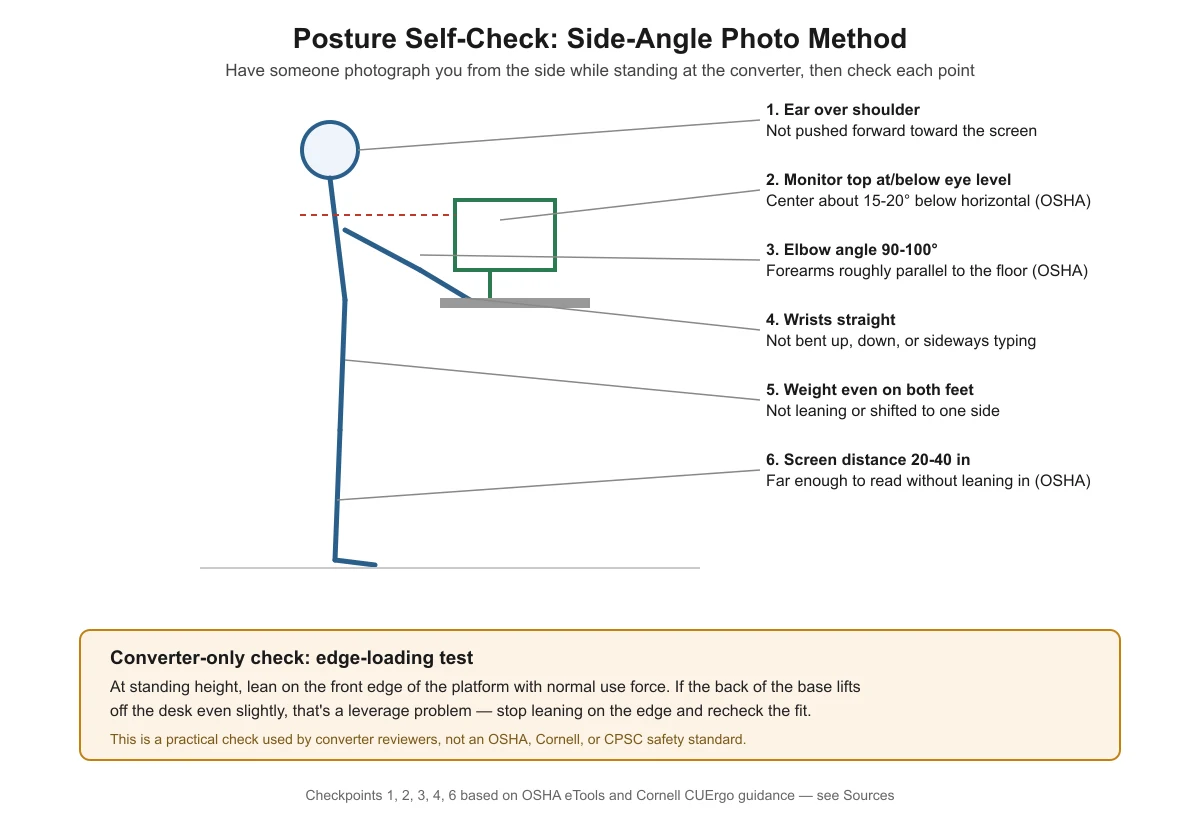
- A side-angle photo of yourself at the converter is a practical way to catch most of these mistakes at once.

What are the most common posture mistakes with a standing desk converter?
Most mistakes fall into five groups: monitor position, elbow and wrist position, standing posture itself, converter-specific stability habits, and simply not switching positions often enough. A converter adds a few habits that a fixed desk or a full electric standing desk doesn’t create, because the platform height, tray angle, and base footprint all interact differently than they would with a single continuous desk surface. If you haven’t finished setting up the converter itself, start with our full setup guide before troubleshooting posture, since a mis-set height causes several of the mistakes below on its own.
Mistake 1: Craning your neck down (or up) at the monitor
OSHA’s computer workstation guidance specifies that the top of the monitor should be at or slightly below eye level, with the center of the screen about 15 to 20 degrees below horizontal eye level, and a downward viewing angle that never exceeds 60 degrees. On a converter, this gets tricky because raising the platform to standing height also raises the monitor — sometimes past where it was comfortable while seated, sometimes not far enough, depending on how your model’s riser and monitor placement interact. If you find yourself tilting your head down or craning your neck up repeatedly, check your monitor height against this guidance both sitting and standing, not just once at setup.
Mistake 2: Bending your wrists instead of keeping them straight
OSHA guidance is direct on this: wrists should not bend up or down or to either side during keyboard use. This applies whether you’re sitting or standing at the converter. A keyboard tray that sits too high forces your wrists to bend upward to reach the keys; one that sits too low does the opposite — see our keyboard tray height guide for how to check and adjust it. Cornell’s ergonomics guidance adds that your elbow angle should be at or greater than 90 degrees, with forearms roughly parallel to the floor — when that’s true, your wrists are much more likely to stay naturally straight without you having to think about it.
Mistake 3: Locking your knees and standing perfectly still
It’s tempting to think “good standing posture” means finding one ideal position and holding it. In practice, that’s a mistake. Cornell’s ergonomics research is explicit that simply standing still isn’t enough — movement is what helps blood circulation through the muscles, not static posture. Shift your weight, take small steps in place, or use a short walk as your break, rather than locking your knees and holding one rigid stance for long stretches.
Mistake 4: Leaning on the platform’s front edge
This one is specific to converters. Clamp-mount and riser-style converters rely on the connection to the desk (clamp tension or base footprint) for stability in a way that a full standing desk’s own legs don’t. Leaning your body weight on the front edge of the platform — to reach something, to rest, or out of habit — puts leverage on that connection that it may not be designed to handle well.
A practical check some converter reviewers use, not an official safety standard: at standing height, lean on the platform’s front edge with normal use force. If the back of the base lifts off the desk even slightly, that’s a sign of a leverage or depth-fit problem, and you should stop leaning on the edge rather than treat it as a stable resting spot.
Mistake 5: Not switching between sitting and standing often enough
Staying in either position too long undoes a lot of the benefit of having a converter in the first place. See our dedicated sit-stand ratio guide for how often to switch and how that differs for manual versus electric converters — but as a posture matter specifically, long unbroken stretches in one position, sitting or standing, tend to reinforce whatever small postural mistakes you’re already making, simply because you’re not resetting your position.
Quick reference: mistake, why it matters, and the fix
| Mistake | Why it matters | Fix |
|---|---|---|
| Monitor too low or too high | Forces neck flexion or extension, straining neck and upper back muscles | Top of screen at/slightly below eye level; check both sitting and standing |
| Wrists bent during typing | Can contribute to wrist and forearm strain over time | Keyboard tray height that keeps elbows near 90-100° and wrists straight |
| Locking knees, standing rigid | Static posture alone doesn’t aid circulation the way movement does | Shift weight, take small steps, treat standing as active, not static |
| Leaning on the platform edge | Puts leverage on a clamp or base connection not necessarily rated for it | Run the edge-loading check; stop leaning on the edge if the base lifts |
| Rarely switching position | Reinforces existing postural habits instead of resetting them | Follow a sit-stand schedule adjusted to your converter type |

Should I worry about pinch hazards when adjusting the converter?
Keep your fingers clear of the lift mechanism itself when raising or lowering the platform, particularly on pneumatic (gas-spring) models. This is a real, documented hazard: in 2016, the U.S. Consumer Product Safety Commission recalled Square Grove sit-stand desk converters (sold under the UPLIFT Desk brand) because the pneumatic lifting mechanism could pinch or break a finger during assembly or use. That recall was specifically about a pinch and finger-injury hazard from the lift mechanism — it was not a tip-over or stability recall, and it does not apply to converters generally. It’s a useful reminder to keep hands away from moving joints and hinges while adjusting height, not a sign that converters are broadly unsafe.

Frequently asked questions
How do I know if my monitor is too low on my converter?
If you find yourself tilting your chin down to read the screen, or your neck feels stiff after extended use, the monitor is likely sitting below the recommended position. OSHA guidance puts the top of the screen at or slightly below eye level; if yours sits well below that, raise it with a stand, arm, or riser block rather than slouching down to meet it.
Is it bad to stand with my knees locked?
Standing with locked knees for long periods isn’t recommended. Cornell’s ergonomics guidance emphasizes that movement, not static standing, is what helps circulation. Keep your knees softly bent and shift your weight periodically rather than locking them in one position.
Why does my converter feel unstable when I lean on it?
Leaning on the front edge puts leverage on the clamp or base connection in a way normal typing and reaching doesn’t. If the back of the base lifts when you lean on the front edge, that’s a sign the depth or clamp fit isn’t right for your desk, not something to push through by leaning more carefully.
Can bad posture at a converter cause long-term pain?
Sustained awkward postures — a craned neck, bent wrists, or hunched shoulders held for hours daily — are generally understood to contribute to musculoskeletal discomfort over time. This article covers posture and setup, not symptoms or treatment; if you’re already experiencing pain, that’s a question for a healthcare provider, not a desk setup guide.
Does switching to standing automatically fix bad posture?
No. Standing with the same craned neck or bent wrists you had while sitting just moves the same mistakes to a different position. Check monitor height, elbow angle, and wrist position again each time you switch, since a setup that worked seated often needs adjustment once you stand.
Sources
- OSHA eTools: Computer Workstations — Monitors
- OSHA eTools: Computer Workstations — Keyboards
- OSHA eTools: Computer Workstations — Evaluation Checklist
- Cornell CUErgo: Computer Workstation Ergonomics Guidelines
- Cornell CUErgo: Sitting and Standing
- U.S. CPSC: Square Grove Recalls Sit-Stand Desk Converters (2016)