A standing desk converter usually feels too low because its maximum lift height falls short of your standing elbow height — not because it’s broken or set up wrong. Measure the actual gap, compare it to your converter’s rated maximum lift, then choose a fix: raise it to full height, close a small gap with a riser block or monitor arm, or switch strategies if the shortfall is bigger than any adjustment can cover.
Key takeaways
- Measure first: standing elbow height minus your current desk height equals the lift you actually need. Compare that number to your converter’s rated maximum lift, not just to how it “feels.”
- Many converters top out around 17-21 inches of lift; a FlexiSpot M7 model, for example, tops out at 19.7-19.9 inches depending on size. If your required lift is higher than your model’s spec, no amount of adjusting will fix it.
- Many owners never run their converter all the way to its true maximum — check that first, since it’s the easiest fix.
- A small shortfall (roughly 1-3 inches) can often be closed with a riser block under the base desk’s legs or a monitor-arm add-on.
- A larger shortfall is a structural limit, not an adjustment problem — a taller converter or a full height-adjustable desk is the more reliable fix.
How do you know if the converter itself is the problem?
Use the same elbow-height math from our setup guide. OSHA’s Computer Workstations eTool says elbows should stay “close to the body and bent between 90 and 120 degrees,” with hands, wrists, and forearms roughly parallel to the floor. Cornell’s ergonomics guidance adds that your elbow angle should be at or greater than 90 degrees. Together, those two sources give you a practical measurement method:
| Step | What to measure | How |
|---|---|---|
| 1 | Standing elbow height | Stand naturally with arms relaxed at your sides, then bend your elbows to 90-120 degrees. Measure from the floor to the bottom of your forearm. |
| 2 | Current desk height | Measure from the floor to the top surface of your existing desk, where the converter sits. |
| 3 | Required lift | Subtract: standing elbow height − desk height = the lift your converter needs to provide. |
| 4 | Compare to your converter’s spec | Check your model’s published maximum lift height. If the required lift exceeds it, the unit is structurally too short for you at this desk — that’s the actual problem. |

What’s the maximum lift of a typical converter?
Lift ranges vary a lot by model, but most desktop converters top out somewhere between roughly 17 and 21 inches above the desk surface on their tallest settings. As one real example, FlexiSpot’s M7 series lists a height adjustment range of 4.7 to 19.7 inches on the 28-inch model and 4.7 to 19.9 inches on the 36-inch model. That’s a useful anchor point, not a universal number — always check your own model’s spec sheet, since “tall” converters built for taller users can go higher.
Decide: raise it, close the gap, or switch strategies
Once you know the size of the shortfall, the fix depends on how big it is.
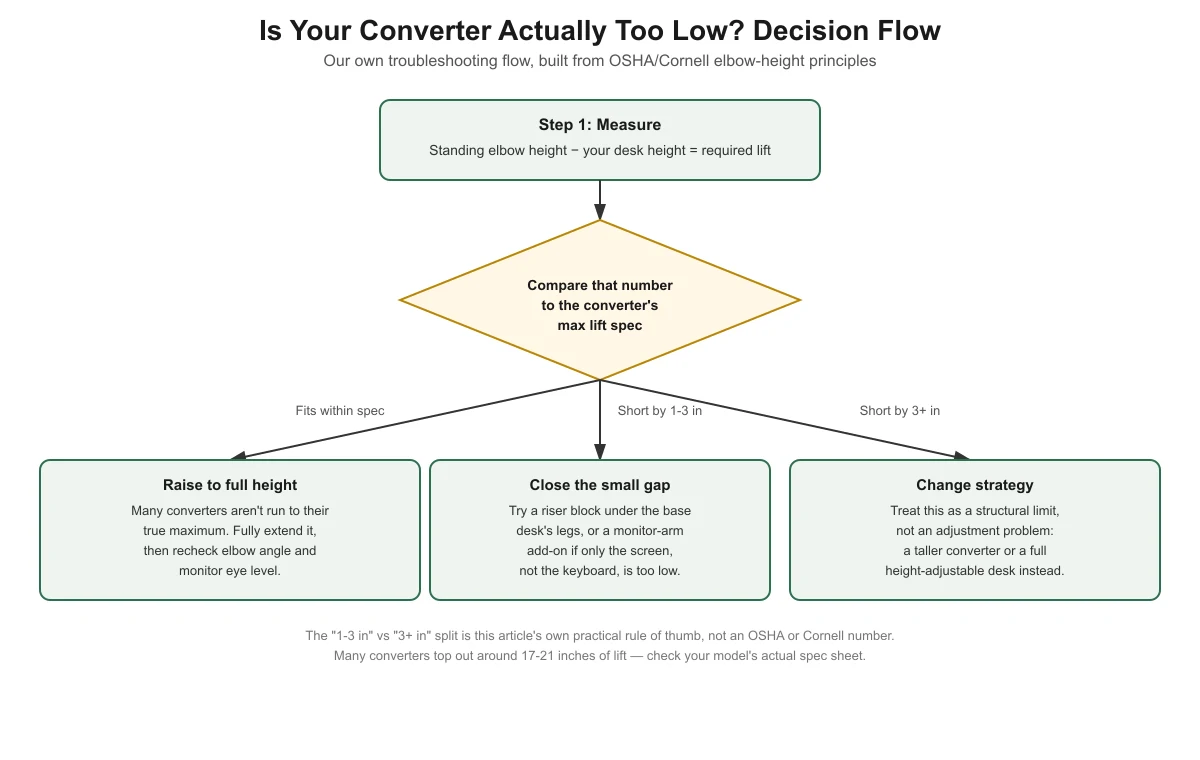
Fits within spec: raise it all the way
If your required lift is at or below your converter’s maximum, the simplest fix is often that the unit just isn’t extended fully. Raise it to its true maximum height, then recheck your elbow angle and monitor eye level against OSHA’s ranges.
Short by about 1-3 inches: close the gap
A desk riser block under the legs of your base desk raises the entire platform, including your converter’s travel range, by a fixed amount — this is a reasonable fix for a small shortfall. If it’s specifically your monitor that sits too low rather than your keyboard and hands, a monitor arm add-on can raise just the screen without changing the desk or converter height at all; see our guide on using a monitor arm with a standing desk converter for compatibility and clearance details.
Short by more than about 3 inches: change strategy
This threshold isn’t an OSHA or Cornell number — it’s this article’s own practical rule of thumb, based on how much height a riser block or monitor arm can realistically and safely close. Once the gap gets large, stacking risers under an existing desk starts to introduce its own stability and desk-damage risks. At that point, a taller converter model or a full height-adjustable desk is a more reliable fix than trying to coax more lift out of equipment that’s already maxed out.

Check your keyboard tray too
If raising your converter changes your elbow height, your keyboard tray height needs to change with it — a tray that was correct before an adjustment often isn’t correct afterward. See standing desk converter tray too low? how to fix it for the full check, done both sitting and standing.
For the complete setup walkthrough this troubleshooting guide builds on, see the pillar article, how to set up a standing desk converter correctly.

Frequently asked questions
My converter has a “max height” listed, but it still feels low once I’m standing. Why?
A published maximum height is usually measured from the desk surface to the top of the unit’s platform, not necessarily to where your hands or elbows end up once a keyboard and wrists are added. Measure your own elbow height against the actual surface height you get when standing, not just the spec sheet number alone.
Will a thicker anti-fatigue mat make my converter feel higher?
A mat raises your feet slightly, which can close a very small part of the gap, but it’s not a real substitute for the inches a riser block or taller converter would add. Don’t rely on mat thickness as your main fix for a converter that’s genuinely too short for you.
Is it safe to put my existing desk on top of risers to gain height?
Furniture risers made for that purpose are generally more stable than improvised stacks. Check that the desk’s base is wide enough relative to the added height to avoid a tipping risk, and confirm the risers themselves are rated for your desk’s weight.
Should I just buy a taller converter instead of troubleshooting mine?
If your math shows a shortfall of more than a few inches, yes — that’s the point where troubleshooting the current unit stops being worth the effort compared to a model built for your height range.
Does a wobbly converter mean it’s also too low?
No — wobble and height are different problems. Wobble is usually about base depth relative to the desk and how the unit is mounted, not how high it lifts. If your converter feels unstable rather than simply short of the height you need, that’s a separate issue from what this article covers.
Sources
- OSHA eTools, Computer Workstations — Positions — elbow angle (90-120 degrees) and wrist/forearm position. Checked November 13, 2026.
- Cornell University Ergonomics Web (CUErgo), Workstation Ergonomics Guidelines — elbow angle at or greater than 90 degrees, and the practical arm-extension measurement method. Checked November 13, 2026.
- FlexiSpot, M7 Series Standing Desk Converters — height adjustment range specification, used as a real-model example. Checked November 13, 2026.
standingdeskconverters.com Editorial Team. Last updated: November 13, 2026.