Ease into a standing desk converter over one to two weeks instead of standing for hours on day one. Most transition pain comes from one of three fixable causes — a riser that doesn’t go high enough, a keyboard tray at the wrong angle, or no anti-fatigue mat — not from standing itself.
Key takeaways
- Build up standing time gradually. Jumping straight to all-day standing is the most common reason new converter owners end up sore and quit within a month.
- Cornell’s ergonomics research center and the 2015 UK expert consensus statement on workplace sitting agree on the same core idea — ease in gradually and move often — even though they don’t use the same numbers.
- A realistic four-week ramp: 30-45 minutes a day in week 1, building toward 2-4 hours a day by week four and beyond.
- If pain continues after you’ve eased in, check three converter-specific causes first: riser height, tray angle, and whether you’re standing on a hard floor without a mat.
- Soreness in the first week or two is common and usually fades as you build up slowly. Pain that doesn’t ease, or sharp joint pain, is a signal to stop and check your setup — not to push through.
Why does switching to a standing desk converter cause pain at first?
Standing for long stretches uses your lower back, hips, and feet differently than sitting does, the same way any new physical routine feels uncomfortable before your body adjusts. The problem isn’t standing itself — it’s standing too much, too soon, without checking whether your converter is actually set up correctly.
Cornell University’s ergonomics research center puts it plainly on its sit-stand guidance page: compliance with new standing habits “rapidly declines so that after 1 month a majority of people are sitting all the time,” and in field studies people who get a sit-stand desk often end up standing for only about 15 minutes a day total. A big part of that drop-off is people trying to stand too much right away, getting sore, and giving up rather than easing in.

What’s a realistic ramp schedule for a standing desk converter?
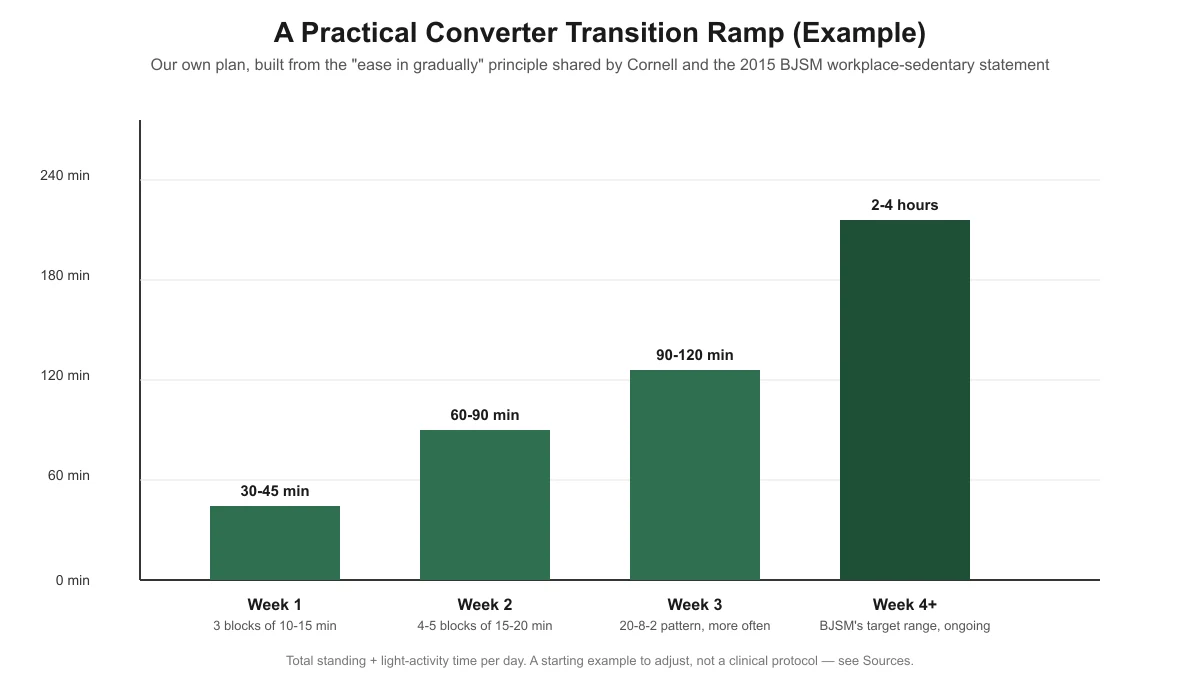
There’s no single official “day-by-day” protocol for easing into a converter — no standards body publishes one. What Cornell’s ergonomics guidance and the 2015 UK expert consensus statement on workplace sitting (published in the British Journal of Sports Medicine) agree on is the underlying principle: build up gradually, and favor short, frequent movement over long static stretches. The 2015 statement specifically recommends that desk-based workers “initially accumulate a total of 2 h/day of standing and light activity at work, progressing to 4 h/d.”
Below is our own practical plan built from that shared principle — not a clinical protocol, and not a number either source states directly. Adjust it to how your body actually responds.
| Week | Standing time target | Pattern | What to watch for |
|---|---|---|---|
| Week 1 | 30-45 minutes/day total | 3 blocks of 10-15 minutes, spread through the day | Mild muscle fatigue in calves/feet is normal; sharp joint pain is not |
| Week 2 | 60-90 minutes/day total | 4-5 blocks of 15-20 minutes | Recheck converter height and tray angle if your lower back aches by block 3 |
| Week 3 | 90-120 minutes/day total | Apply Cornell’s 20-8-2 pattern more often: 20 minutes seated, 8 minutes standing, 2 minutes moving | Add an anti-fatigue mat now if you haven’t already |
| Week 4 and beyond | 2-4 hours/day total | The 2015 consensus statement’s target range, maintained ongoing | If you plateau below this comfortably, that’s fine — the range itself is a goal, not a requirement |
Stop and check these 3 things if pain doesn’t ease up
If you’ve been building up gradually and you’re still sore after the first couple of weeks, the ramp schedule probably isn’t the problem — your setup is. Work through these three converter-specific causes before assuming you just need to push through it.
- Is the riser actually high enough? A converter that sits too low forces you to hunch or lean on it, which shows up as shoulder and lower-back pain. See why your standing desk converter feels too low for the measurement method and fix options.
- Is your keyboard tray at the wrong angle or height? A tray that’s too high or too low changes your wrist and elbow position every time you type, which compounds over a standing session.
- Are you standing on a hard floor without a mat? Standing directly on tile, concrete, or hardwood concentrates pressure on your feet in a way that gets uncomfortable fast. See do you need an anti-fatigue mat with a desk converter for sizing guidance matched to a converter’s smaller standing footprint.
Does it matter if your converter is manual or electric?
In practice, a manual gas-spring or crank converter takes more physical effort to raise and lower than pressing a button on an electric one. That extra friction can make people switch between sitting and standing less often than the ramp schedule above assumes. If you have a manual converter, it’s reasonable to lean on longer standing blocks rather than frequent short switches, since the physical effort of switching works against you otherwise. This is practical reasoning, not a finding from any study — no source distinguishes manual from electric converters on this point.
Before you start the ramp at all, confirm your converter is actually set up correctly — elbow height, monitor distance, and tray position. See the pillar guide, how to set up a standing desk converter correctly, for the full measurement walkthrough.
Frequently asked questions
How long should transition soreness last before I worry?
Mild muscle fatigue in your legs, feet, or lower back in the first one to two weeks is common while your body adjusts to a new position. If soreness hasn’t eased after two to three weeks of gradual ramping, or if you feel sharp joint pain at any point, stop increasing your standing time and recheck your setup rather than pushing through.
Can I skip the ramp and just stand all day from the start?
You can, but Cornell’s own data on sit-stand desk compliance suggests this is exactly why so many people abandon standing desks within a month — going too hard too fast leads to soreness, which leads to giving up. A gradual ramp is slower but more likely to stick.
Is 2-4 hours a day of standing actually necessary?
The 2-4 hour range comes from the 2015 UK expert consensus statement on workplace sitting, framed as a target to build toward, not a strict daily requirement. Cornell’s own guidance adds that movement — not just standing still — is what matters most, so short, frequent breaks count toward this even if you’re not at a desk converter the whole time.
Should the ramp schedule be different if I have an existing back or joint condition?
This article covers general ergonomic transition pain, not medical conditions. If you have an existing back, hip, knee, or joint condition, talk to a healthcare provider about a safe pace for introducing standing work before following any general ramp schedule, including this one.
What if I’m still sore after fixing the riser, tray, and mat?
If you’ve confirmed your setup is correct and you’re still uncomfortable after a reasonable ramp-up period, the issue may be unrelated to the converter itself — footwear, an existing condition, or simply needing more time to adjust. At that point it’s worth checking with a healthcare provider rather than continuing to troubleshoot gear.
Sources
- Cornell University Ergonomics Web (CUErgo), Sitting and Standing at Work — the 20-8-2 pattern, sit-stand compliance data, and the Cornell guidance that movement matters more than static standing. Checked November 13, 2026.
- Buckley JP, et al., “The sedentary office: an expert statement on the growing case for change towards better health and productivity,” British Journal of Sports Medicine 2015;49:1357-1362, as quoted and cited in “How did the public respond to the 2015 expert consensus public health guidance statement on workplace sedentary behaviour?”, PMC, National Library of Medicine — the 2 h/day progressing to 4 h/day standing target. Checked November 13, 2026.
standingdeskconverters.com Editorial Team. Last updated: November 13, 2026.